Blog Feed

Final Graphic Design Project

The job of a TV meteorologist doesn’t end when the lights and cameras turn off in the studio. As a part of our contract, we represent the station in the community in various ways. We regularly emcee events, play the role of auctioneer, participate in charity functions, and make appearances at events for our community partners. It’s a great way for those of us on TV to meet people, give back, and help promote our station.

One of my favorite ways to contribute outside of the newscasts is visiting local elementary schools. In the past ten years at KPTV, I’ve visited over 160 classrooms (about 15-20 a year) to teach kids about the weather. From kindergartners to high schoolers, I’ve found that most kids are fascinated by the weather and want to learn about the science behind it.

Since the school year just started at our Portland area schools, I decided to create a graphic to use on my blog and other websites to promote our “Weather in Schools” program. Parents and teachers are the primary audiences for this composition. The setting for the graphic is the front of a classroom.

First, I wanted to add texture to the back wall in the image. I used the bevel & emboss feature and added a texture that would look less flat and more like a painted wall. I ran into the problem of the bevel coming through on the sides, so I made the layer slightly larger to hide that.

I made sure there was a call to action, to encourage people to check out our website and sign up. I chose the typeface at the top and bottom of the graphic because it had a playful chalk look, but I didn’t like it for the main chalkboard font, because some of the letters were hard to read (particularly the lowercase “t”). For that, I had to create my own chalk look. First, I rasterized the font so I could manipulate it. Then, I added a noise filter. This broke up the letters a bit. I used 150% for the amount and made the distribution Gaussian so the dark parts would be more random. I also dropped the opacity of the text, down to 90% so it wasn’t too bright and looked more realistic.

I wanted to use dramatic photos, because during my talks, I focus on some of the more intense kinds of weather events. I decided to use pins to give it a bulletin board kind of look next to the chalkboard. Each photo has a drop shadow at 120°. I adjusted the hue and saturation of all three photos to give different looks. The chalkboard also has a 120° drop shadow.

In my first draft, I thought it would be fun to implement the chalk look to my headshot as well. However, my classmate Justin made a good suggestion during the peer review process of this project. He said the “chalk drawn” photo was a little distracting because it was too distorted and it might not be worth using this effect. He offered the suggestion of “taping” the photo to the blackboard instead. I made tape out of a couple of lines and set a low opacity. I then gave the ends of the tape a jagged edge using the eraser tool. This gave it a much cleaner look.

Also in my first draft, I had the text on the bottom more right aligned, but after Justin’s feedback and stepping back from the project for a couple of days, I decided to center the words at the bottom to give it a better flow.

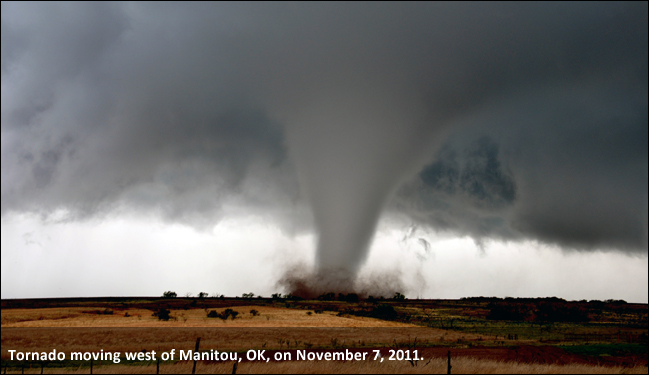
I made sure to use photos that adhere to copyright law. The hurricane satellite photo is from the National Hurricane Center and the tornado photo is from the National Weather Service’s Chris Spannagle. Works produced by the United States government are not copyrightable. The lightning photo, pins (red & blue), and chalkboard use a license from Pixabay, which can be used freely for commercial or noncommercial use. I took the photo of Mt. Hood and the headshot photo.

This project was valuable for learning about some of the basics of Photoshop. It’s a very powerful program and I’m anxious to watch more tutorials, because I am just scratching the surface of what it can do.

Draft Graphic Design Project

The job of a TV meteorologist doesn’t end when the lights and cameras turn off in the studio. As a part of our contract, we represent the station in the community in various ways. We regularly emcee events, play the role of auctioneer, participate in charity functions, and make appearances at events for our community partners. It’s a great way for those of us on TV to meet people, give back, and help promote our station.

One of my favorite ways to contribute outside of the newscasts is visiting local elementary schools. In the past ten years at KPTV, I’ve visited over 160 classrooms (about 15-20 a year) to teach kids about the weather. From kindergarteners to high schoolers, I’ve found that most kids are fascinated by the weather and want to learn about the science behind it.

Since the school year just started at our Portland area schools, I decided to create a graphic to use on my blog and other websites to promote our “Weather in Schools” program. Parents and teachers are the primary audiences for this composition.

I made sure there was a call to action, to encourage people to check out our website and sign up. I chose the typeface at the top and bottom of the graphic because it had a playful chalk look, but I didn’t like it for the main chalkboard font, because some of the letters were hard to read (particularly the lowercase “t”). For that, I had to create my own chalk look. More on that later.

The hurricane satellite photo is from the National Hurricane Center and the tornado photo is from the National Weather Service’s Chris Spannagle. Works produced by the United States government are not copyrightable. The lightning photo, pins (red & blue), and chalkboard use a license from Pixabay, which can be used freely for commercial or noncommercial use. I took the photo of Mt. Hood and the headshot photo.

I wanted to use dramatic photos, because during my talks, I focus on some of the more intense kinds of weather events. I decided to use pins to give it a bulletin board kind of look next to the chalkboard. Each photo has a drop shadow at 120°. I adjusted the hue and saturation of all three photos to give different looks. The chalkboard also has a 120° drop shadow.

I also wanted to create a “chalk look” to my headshot and the writing on the chalkboard. For the words, I used the text button to create the words and position them. Then, I rasterized the font so I could manipulate it. Then, I added a noise filter and lowered the opacity on the noise to give it a broken up chalk look.

For the photo, I used the artistic filter and settled on the chalk/charcoal setting and made sure it was monochrome. I tinkered with the adjustments so that you could still tell it was my face. Then, I used the smudge tool on the sides to give it less of a perfect box photo feel. Finally, I added a noise filter to break it up and give it the look as if it was drawn with chalk. I decreased the opacity of the noise to about 70%.

I chose to offset my text to read from the top left to bottom right. The eye naturally goes this way when reading and I think it flows nicely.

I am looking forward to the review process of this project to improve the final design.

Photoshop Tutorials

On this blog, I’ll also be posting my work and assignments from COM 561: Professional Multimedia Content Creation at WSU.

Here are my completed photoshop tutorials.

News, weather, and everything in between

I want to take the opportunity on this first post to say, “Welcome!” Thanks for checking out my blog.

I’m going to focus this blog on the world of television news and the stories we cover. Television is a fantastic medium to deliver and ingest the important news of the day. We give you all the information you need to know in a short amount of time. Our producers, writers, reporters, and anchors at KPTV curate the content for the viewers, so all they have to do is turn it on and watch.

It’s a fast paced, sink or swim industry and it takes some incredible teamwork every day to pull it off. When I sit back and think about it, I realize it is an amazing feat that our station produces 13 hours (soon to be 14 hours) of news content every day. So many different things must come together daily and somehow, someway, they do.

We have a lot of newscasts, but the pace of TV news brings some limitations. Most news stories are 90 seconds. Most weathercasts are three minutes tops. I want this blog to show a little more. I’ll take you through a closer look at the weather and news stories I cover. I’ll also be able to peel back the curtain to show you what goes on behind the scenes at a TV news station.

Unlike many other professions, TV news has a hard deadline every day. If your story isn’t ready by 5:00 PM, the show is still going to happen without you. The computers could all crash, we could lose a reporter’s story at the last minute, there could even be an earthquake and the show must go on.

We’ve had a few hiccups in the weather center lately with our graphics freezing up on air. Yesterday, I was 30 seconds into a three-minute weather hit and my graphics were stuck. What did I do? The only thing I could do… adlib to fill the time. Thank goodness for my improv background… phew!

On that note, big news in the FOX 12 Weather Center today. We got new computers! Thanks to Thursday Night Football on FOX preempting a couple of newscasts, we were able to spend about six hours hooking everything up. We went from driving an old jalopy to a Lamborghini. It’s amazing what some new hardware can do.

I’m looking forward to your thoughts, questions, and comments over the coming weeks and months. Until next time!

Blog at WordPress.com.

Up ↑

Design a site like this with WordPress.com
Get started